Direct Booking Widget: visual improvments
Some small visual changes to the booking widget would make it more friendly for users. We regularly receive questions regarding the days available and pricing because of how these two things display in the booking widget.
1. The price per night displayed at the top of the widget is confusing for prospects because it displays an average price for the days available. But the actual prices for the dates that they are interested in my be much higher or much lower. Removing this from the top of the widget provide a better user experience.
2. The way available dates show up in the booking widget is confusing for prospects because only check-in dates available appear to be available. Once you click on them other dates appear available, but if the prospect doesn't click on a date they may have the false impression that only a few dates are available. A better solution would be to show 3 things visually: 1) dates that are already booked, 2) dates available for check-in and check-out 3) dates available, but not for check-in. VRBO does a good job of showing all 3 of these things clearly. See the picture below:
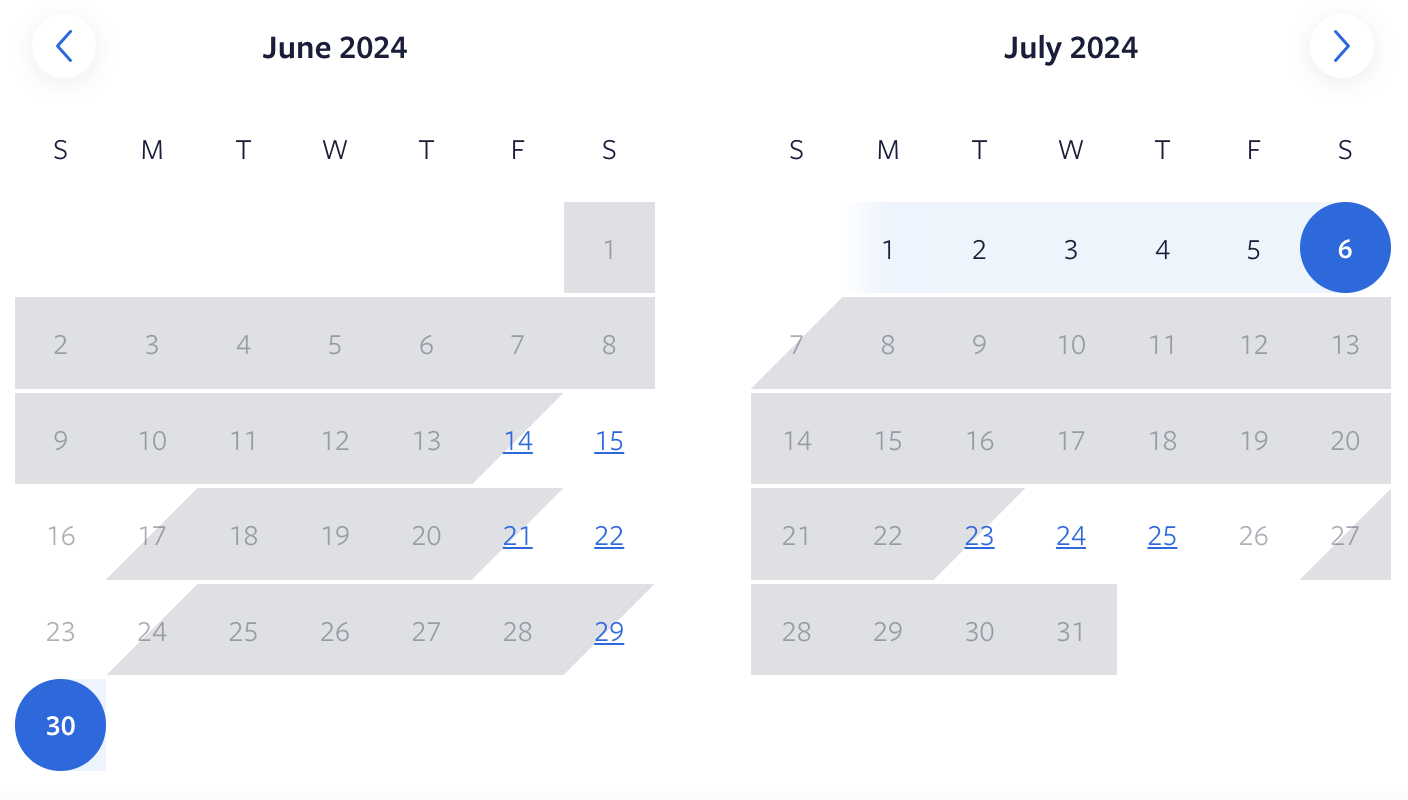
Making these changes will greatly improve the usability of the booking widget.
Log in to comment and vote
Comments4
Eric Allen
Sep 7, 2025
Yes yes, showing available dates and their prices — essential!
CHRIS MCCOURT
Mar 7, 2025
the current plugin calendar does make some dates look unavailable until you select them. a calendar like this would be good
Scott Kudrick
Apr 16, 2024
I agree, the way the display of available dates is not user friends at all. Dates that are available show unavailable until a guests checks on the check in date if you have Min stay that blocks out the dates after the check in day, so potential prospects do not see the couple of days they want available as available. Please compare to how AIRBNB or VRBO displays the same availability.
Chris Wilson
Apr 9, 2024
Today I received more evidence that the booking widget needs some improvement to how unavailable dates, free dates, and how minimums appear on the calendar.
We received a email from a guest wanting to book June 29 through July 7, days which are currently available. But because of our minimum stay requirements for those dates only June 29 and 30 looked available to the guest, but those are the only days showing up for check-in because of our minimum stay requirements. The guest didn’t understand why the other days were crossed through.
The example I shared with the original post showing how VRBO shows days free for booking and dates available to check-in and out would clearly show dates available.